
Designing for Gesture Navigation
Future of immersive experience The future of immersive experience is towards the gesture as the technology becomes more viable the experience and interaction become more seamless.
Designing for Gesture Navigation
Future of immersive experience
What and Why?
One of the notable features in Android Q (aka Android 10) is gesture navigation. Allowing users to navigate back or to the home screen with gestures rather than buttons. Even the Android Assistant can be triggered using gestures now. Though it triggered a lot of conversations among the user community, a lot of research has gone behind this new navigation approach. Even I was hesitant initially and felt uncomfortable moving away from the buttons which I was using from the initial days but over a period of time, it’s more natural and unobtrusive.

To know more about the research and findings:
How to design with/for Gesture navigation?
With edge-to-edge displays becoming the norm, its time for the apps to give its user the immersive experience they deserve on the edge-to-edge displays. To help apps achieve this android has introduced gesture navigation so apps can build a completely immersive experience for their products.
While designing for this experience we should keep the system gestures to give a seamless experience in the ecosystem. Some common gestures currently in android 10 are,
Swipe horizontally from one of the display’s edges to trigger the back functionality.
Swiping up from the bottom display edge allows the user to go to their home screen or recent apps.
Swiping down from the top display edge allows the user to open notification drawer / quick settings drawer.

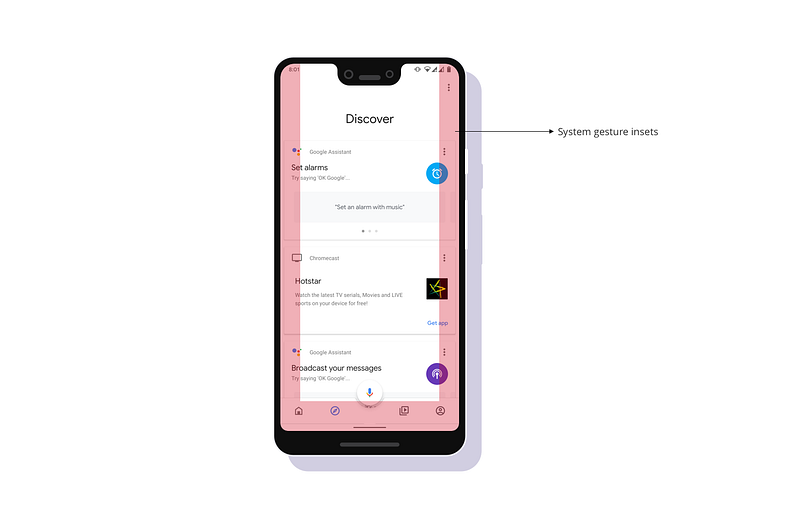
So while designing for devices with gesture navigation the design should accommodate the system gesture insets. The recommended insets are
0 0
+--------------+ +--------------+
| | | Mandatory |
| System | | System |
40 | Gesture | 40 0 | Gesture | 0
| Insets | | Insets |
| | | |
+--------------+ +--------------+
60 60
The future of immersive experience is towards the gesture as the technology becomes more viable the experience and interaction become more seamless.
For more articles on mobile