
Designing Spatial UI: Part 1
Understanding Spatial Sizing
Designing Spatial UI: Part 1
Understanding Spatial Sizing
To understand the sizing in AR, we should understand the concept of pixel count (also known as resolution), spatial pixel density (measured in PPI), and angular pixel density (measured in PPD).
For understanding, let us take two devices with the same resolution 1920x1080, A television with 49" of diagonal size and a mobile device with 5".
Pixel Count:
Pixel count or resolution is the number of pixels in the length and breadth of the screen.
Pixel Count= Horizontal Number of Pixels * Vertical Number of Pixels
In our case, 1920 pixels along the length and 1080 pixels along with the height.
To calculate pixel count, we can multiply the pixels both in length and breadth,
Pixel Count = 1920*1080 = 2073600 (~2 MP)
Spatial Pixel Density:
Pixel density refers to how many pixels have been squeezed into a physical amount of space.
Pixel Density= Root((Horizontal Number of Pixel²) + (Vertical Number of Pixel²))/Screen Size
In our example, 1920x1080 pixels are packed in 5" (Mobile) and 49" (TV) diagonal screens, respectively.
Pixel Density,
Mobile Device = sqrt((1920*1920)+(1080*1080))/5 = 440.58 PPI
Television = sqrt((1920*1920)+(1080*1080))/49 = 44.96 PPI
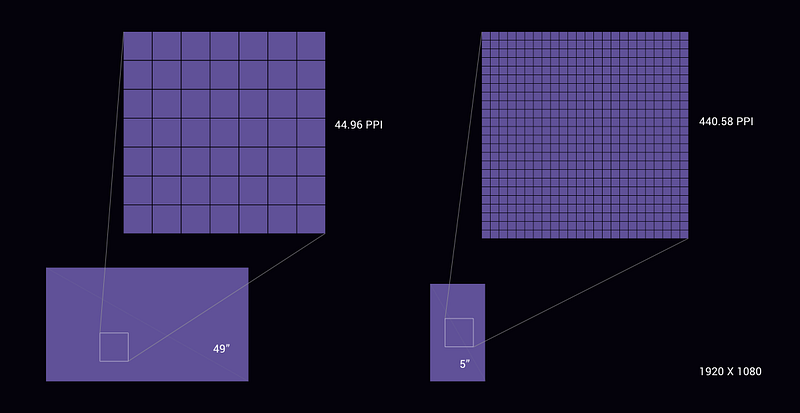
*Both pixels are exaggerated for demonstration purpose
Angular Pixel Density:
The number of pixels per degree presented to the eye at a distance. Pixels per degree is a way accounting for both distance from the display and the resolution of the display. Which is a more appropriate way of representation of pixel density for HMD displays.
Pixel Density= 2*Distance*PPI*tan(0.5°)
Now let’s position the above screens at an ideal viewing distance of 1 foot (12") for mobile and 6 feet (72") for television.
Angular Pixel Density,
Mobile = 2*12*440.58*tan(0.5) = 92.28 PPD
Television = 2*72*44.96*tan(0.5) = 56.5 PPD
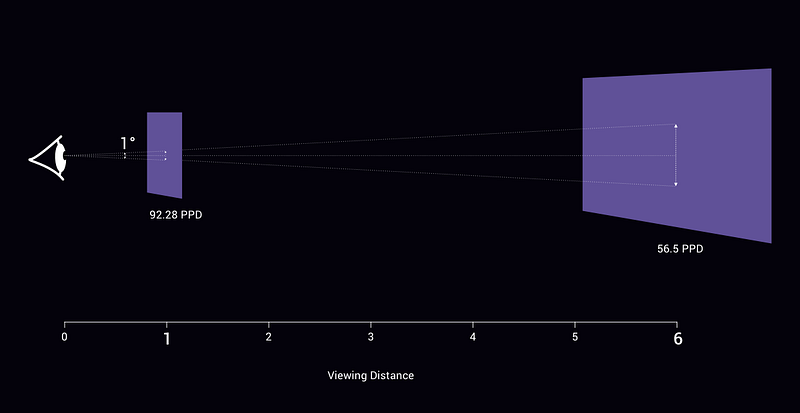
*Angles are exaggerated for demonstration purpose
You can also calculate the PPD, by dividing the horizontal/ vertical pixel count by the angle respectively.
Pixel Density = Horizontal Resolution / Horizontal FoV
Pixel Density = Vertical Resolution / Vertical FoV
A screen with 1920x1080 viewed at 34-degree horizontal field of view would have 1920/34 = 56.5 PPD
Visual Acuity (20/20 Vision)
20/20 vision is a term used to express normal visual acuity (the clarity or sharpness of vision) measured at a distance of 20 feet (6.1m).
If you have 20/20 vision, you can see clearly at 20 feet what should typically be seen at that distance. If you have 20/100 vision, it means that you must be as close as 20 feet to see what a person with normal vision can see at 100 feet. Prescription glasses, contact lenses are used to bring the vision to 20/20 in those cases.
Having 20/20 vision does not necessarily mean you have perfect vision. 20/20 vision only indicates the sharpness or clarity of vision at a distance. Other relevant vision skills, including peripheral awareness or side vision, eye coordination, depth perception, focusing ability, and color vision, contribute to your overall visual ability.
To understand how the human eye works, look at my previous article.
Understand Human Anatomy before XR Experience DesignFor Extended reality (XR) Experiencesmedium.com
A person with 20/20 vision is expected to read 720 PPI at a distance of 1 ft (0.3m). Humans can see a maximum of 300 PPI from a distance of 2.5 ft (0.76m). Beyond the distance of 3 to 4 feet (0.91m — 1.22m) from the display, the human eye cannot see the individual pixels. And also, in degree, humans will be able to resolve up to 60 pixels per degree (PPD).
Distance plays a vital role in the packaging of pixels in space so that we can match the ability of the eye.
The TVs are designed to be viewed at a distance of 1.5–2.5 times its size, which roughly translated to a viewing distance of 6–10 feet in our example of 49". While mobile phones viewing distance is around 1 to 2 feet. So screens which are meant to be seen at a distance shorter than 3 feet are packed with higher pixel density.
The XR Space:
With the above understanding of the pixel density, let try to understand them in the XR space. The optimal zone starts from 4.1 feet (1.25m) to 16.4 feet (5m) for HMD devices. It is advisable to place extended flat interactions at 6.56 feet (2m) for gaze and controller interactions. In comparison, for direct hand interactions, it is placed less than 3.28 feet (1m) around 2.13 feet as the average human arm length is 2.08 feet.
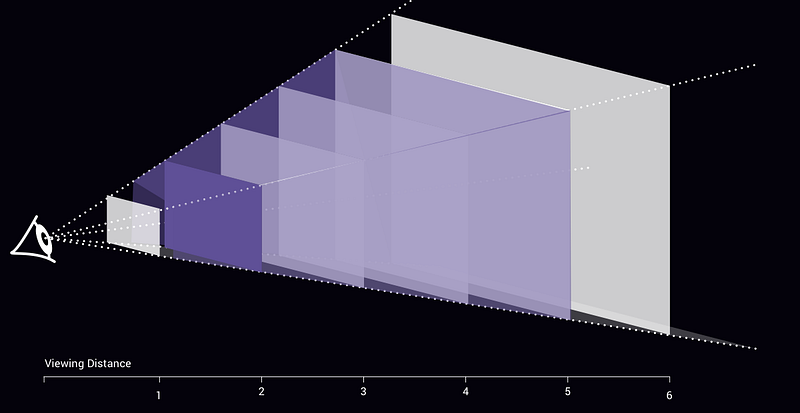
Since, unless like the television or mobile, the screen here is not physical and it varies with the distance.
The size of an object cannot be defined just in pixels or similar size measurements in the spatial world. Unlike in 2-dimensional applications in mobile or television, the size of an object in the spatial world inherently depends on the distance from the viewer to the object.
Though the screen size increases as the distance increases but the perceived size of the objects decreases as the distance increases. Using this scale of the object is used as one of the most important visual cues in XR experiences, giving a viewer a sense of the size of an object as well as cues to its location. Viewing objects at real scale is the critical differentiator in the spatial world compared to the previous on-screen based experiences.

Perceived Size
The calculation for the Spatial UI:
To understand the pixel density of the XR space, we should know the pixel count (resolution), aspect ratio, and field of view of the HMD device.
Calculating Horizontal and Vertical Field of View:
FoV is the observable area a person can see through his or her eyes or via an optical device at any given moment.
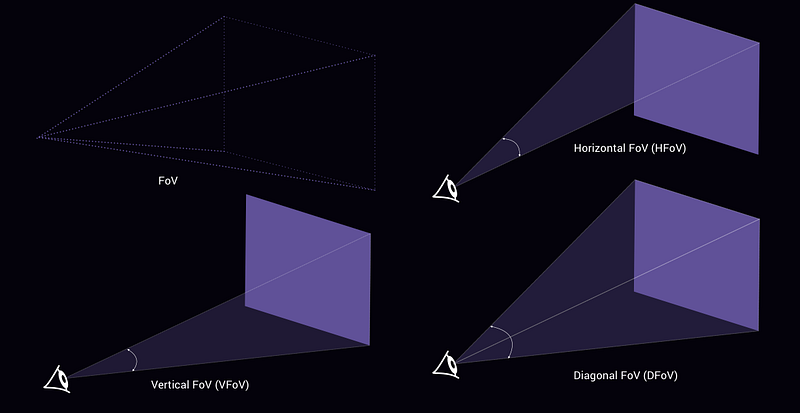
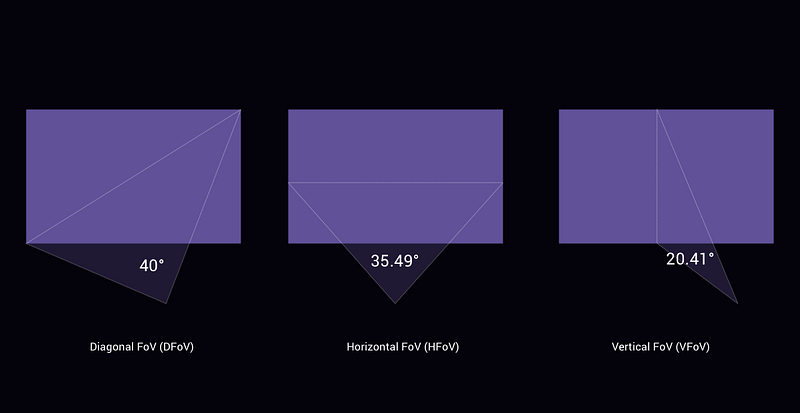
Let us consider an HMD device with the same resolution of our previous examples 1920 x 1080 per eye. At 16:9 ratio with Diagonal FoV of 40**°.**
To calculate the HFoV and VFoV from the DFoV. We need to calculate the diagonal aspect ratio (Da).
Using the Pythagorean theorem,
Da = SQRT(Ha²+Va²)
Da = sqrt((16*16)+(9*9)) = 18.36
applying the calculated diagonal aspect ratio, We can calculate
Horizontal Field of View as,
HFoV = atan( tan(Df/2) * (Ha/Da) ) * 2
HFoV = atan(tan(40/2)*(16/18.36))*2 = 35.49°
and Vertical Field of View as,
VFoV = atan( tan(Df/2) * (Va/Da) ) * 2
VFoV = atan(tan(40/2)*(9/18.36))*2 = 20.41°
Calculating the pixel density of the XR space:
To calculated pixel density in PPD,
Pixel Density = Horizontal Resolution / Horizontal FoV
Pixel Density = 1920/35.49 = 54.1 PPD
Pixel Density = Vertical Resolution / Vertical FoV
Pixel Density = 1080/20.41 = 52.92 PPD
~ 53 PPD which is less than 60 pixels per degree the “normal” visual acuity of humans.
Calculating the real size in the XR space:
Now using the angular diameter calculation (Real Size = 2*distance*tan(angle/2)), we can measure the size of the screens,
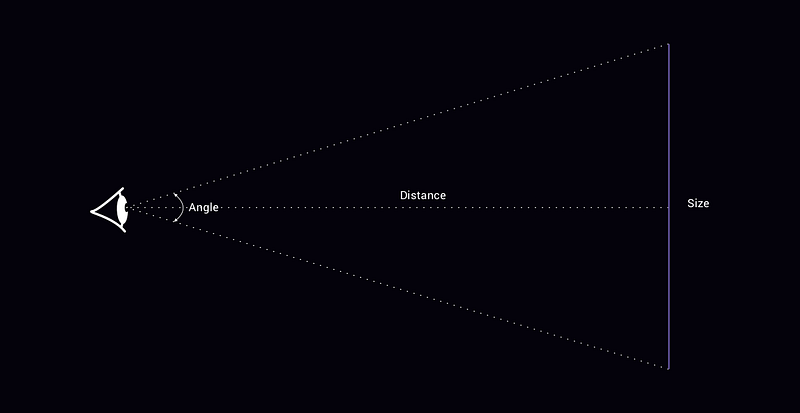
Length = 2*distance*tan(horizontal angle/2)
Breadth = 2*distance*tan(vertical angle/2)
In our example horizontal angle = 35.49° and vertical angle= 20.41°, so the size of the screen at a distance of 2m will be,
Length = 2*2*tan(35.49/2) = 1.28m
Breadth = 2*2*tan(20.41/2) = 0.72m

We can use the same formula to calculate the target size of the interactions. The minimum target size for the spatial elements are expected to be 1 to 1.5 degrees, this can go up to 3 degrees when we need faster interactions.
So far interactable elements at 2m the minimum target size are,
Size = 2*2*tan(1.5/2) = 0.05 m
Size = 2*2*tan(3/2) = 0.1 m
5 - 10 cm is the minimum target size of the interaction elements at 2m.
Calculating PPI for design:
Pixel Density= Root((Horizontal Number of Pixel²) + (Vertical Number of Pixel²))/Screen Size
Pixel Desnity = sqrt((1920*1920)+(1080*1080))/28.74 = 76.65 PPI
You can use this handy Spatial Calculator I created for the above calculations.